Email preferences
Control which email categories WonderMoney sends and turn them all off at once.
The email preference center controls which emails WonderMoney sends to your account. You can turn each email category on or off individually, and use a master switch to turn off all non-essential email at once.
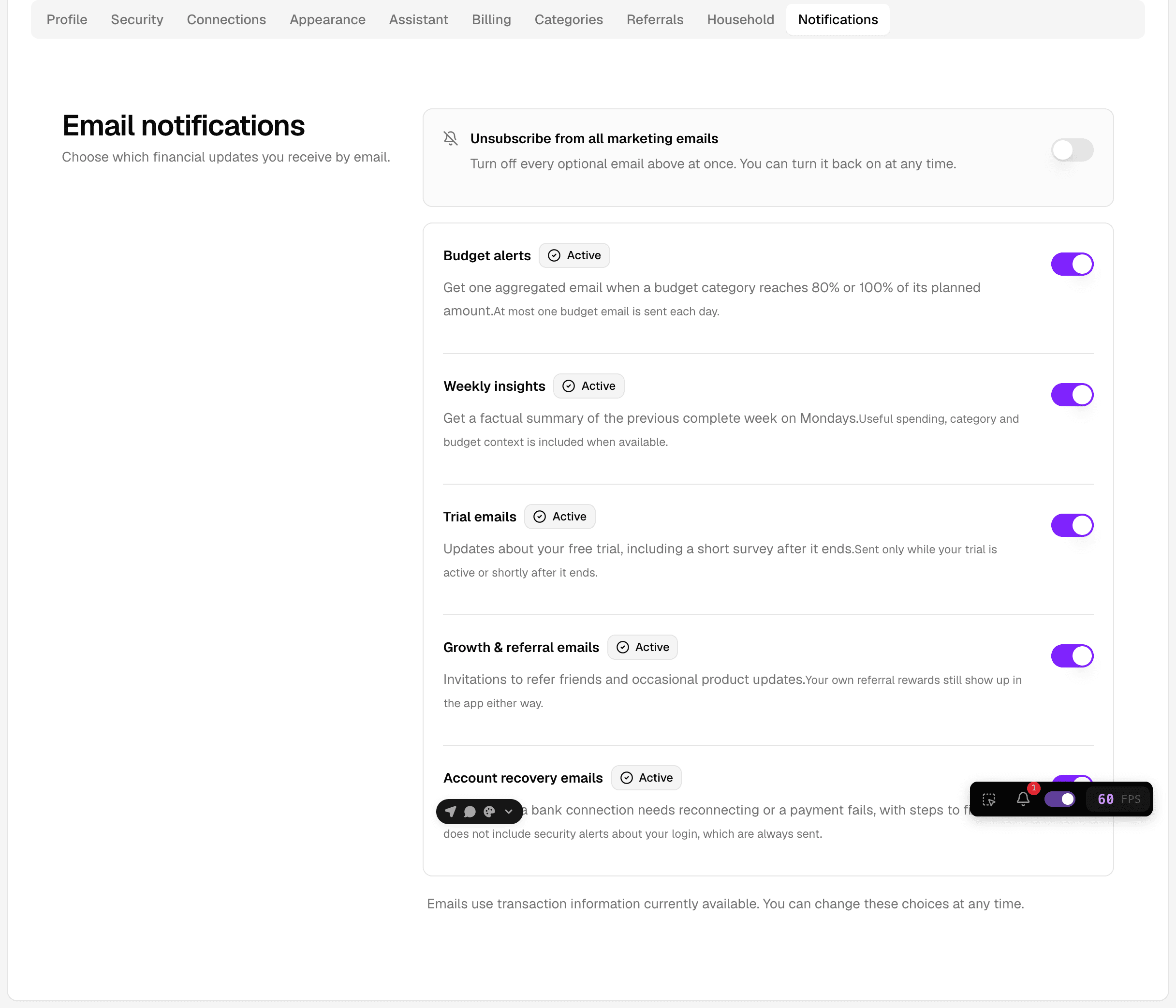
Email categories
Each email category covers a set of related messages. You can enable or disable every category independently.
- Bank recovery covers messages about restoring or reconnecting a bank connection.
- Financial covers budget alerts and weekly insights.
- Account recovery covers messages that help you regain access to your account.
Some categories are on by default. Budget alert and weekly insights emails are enabled in production, so they are sent unless you turn off the financial category or disable it in the preference center.
Master switch
The master switch turns off all marketing and informational email categories at once. It does not stop security-critical transactional email.
Marketing and transactional consent
Consent for email works in two parts:
- Marketing and informational email is optional. You can turn it off per category or with the master switch.
- Transactional email is required for the service to work. Security-critical messages, such as password recovery and sign-in notifications, cannot be unsubscribed from.
Transactional consent is handled separately from the email categories. Even with the master switch off, WonderMoney continues to send the messages needed to keep your account secure and to deliver the service.
Where to find it
- Open settings.
- Go to the email preferences area.
- Adjust the categories you want to receive.
- Save the changes.
If you do not see the email preference center, check that you are signed in to the correct account and that the settings page is fully loaded.