Shared context
See how shared accounts, budgets, goals, and net worth appear in each member's view.
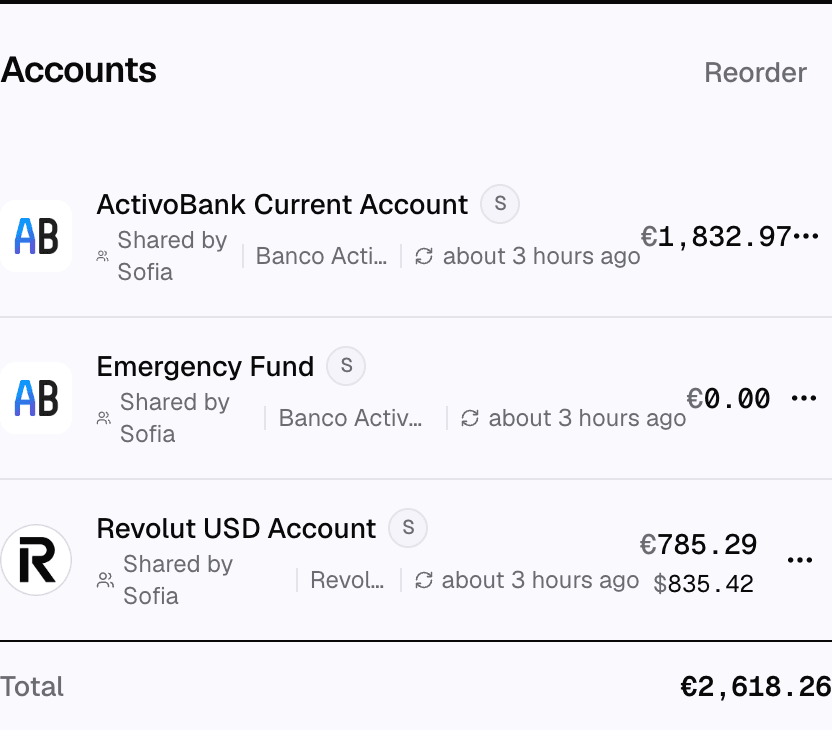
Shared data appears in every member's view. When an account, budget, goal, or net-worth figure is shared, each member sees the same household-level numbers from their own login.
The household holds accounts, transactions, categories, goals, budgets, portfolio, cash flow, and net worth, so everyone works from the same underlying data.
What is shared
- Accounts shared with the household, with their transactions and balances, and the private accounts shared with you.
- Budgets and categories, when they belong to the household.
- Goals and their progress.
- Portfolio, cash flow, and net worth, calculated from the accounts you can see.
Because everyone reads the same data, changes made by one member appear in everyone else's view. Viewers see the shared data but can't change it, and a member who can only view a private account can't change it either.
When members use different currencies
Each member picks their own currency, and sees every total in it. Net worth, cash flow, spending by category, money in and out on the transactions page and the money available to assign to goals convert the other members' balances and transactions into your currency at the exchange rate of the day before adding them, so the total means one thing.
A budget is the exception: it keeps the currency it was created in, because its planned amounts are in that currency. Everyone sees its spending in the budget's currency, with the other members' transactions converted into it at the exchange rate of their date. A loan repayment counts by its interest and fees, which are converted from the loan's currency at the exchange rate of the repayment's date. The budget vs actual report follows the budget too: its amounts are in the budget's currency, whoever views it. Spending by category, on its report and on the accounts page, counts loan repayments the same way, in your currency. Dividend income converts each dividend into your currency at the exchange rate of the day it was paid.
When no exchange rate exists for a currency, the amounts in it are left out rather than added at face value, and the total is shown as incomplete. On the spending by category and budget vs actual reports, the spending by category on the accounts page, money in and out on the transactions page and the dividend income, a note says how many amounts were left out and in which currencies. The cash flow and cash flow Sankey reports show the same note, on the web and in the mobile app.
The portfolio history chart works the same way: each member's portfolio value for a day is converted into your currency at that day's exchange rate. On a day with no rate, that portfolio is left out of the day's total and a note under the chart says the history is partial.
The net worth history and the period return on the portfolio dashboard convert portfolio values the same way, each at the exchange rate of the day the value was recorded. The buys and sales made during the period are converted at the exchange rate of their own dates. A dividend is converted at the exchange rate of the day it was paid, including one paid in a currency that no member uses. A net worth point with a portfolio value that cannot be converted is shown as incomplete, and a period return whose starting value, or one of whose buys or sales, cannot be converted is not shown.
The portfolio's annual yield, volatility and maximum drawdown read every buy, sale and dividend, and the daily portfolio values, in your currency, converted the same way. When one of them has no exchange rate, that figure is not shown rather than computed from two currencies.
What stays separate
A private account is excluded from the picture of every member it is not shared with. It does not appear in their lists, totals, budgets, reports or net worth. See Account privacy for how this is set.