Portfolio metrics explained
Understand portfolio value, cost basis, return, allocation, benchmarks, dividends, and currency effects in WonderMoney.
WonderMoney shows portfolio data so you can understand what changed. This page and its data are informational only. WonderMoney does not tell you what to buy, sell, or hold.
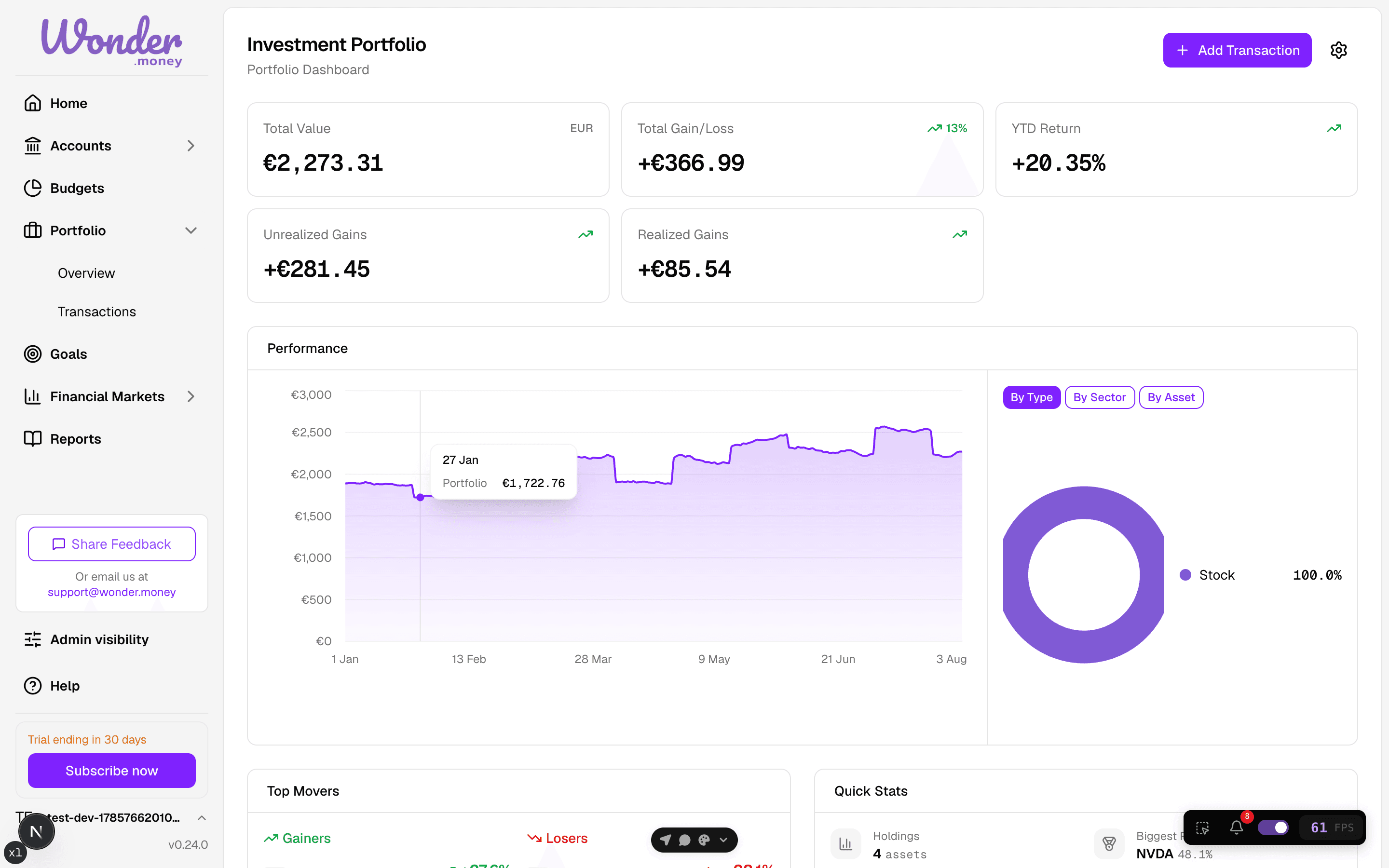
Portfolio value
What it means
The total value of the portfolio based on the current market value of its holdings.
Where it appears
Portfolio summaries, performance views, and portfolio detail headers.
How to read it
Compare it with your cost basis and with the same portfolio over time.
What can make it change
Market price moves, new trades, dividends, fees, and currency effects.
Common misunderstanding
It is not the same as cash invested or what you originally paid.
Cash invested and cost basis
What it means
Cash invested is the money you have put into the portfolio. Cost basis is the tracked amount you paid for the current holdings, including tracked costs.
Where it appears
Portfolio totals, holding details, and gain/loss views.
How to read it
Use it as the baseline for return and unrealized gain or loss.
What can make it change
New buys, sells, transfers, and any tracked purchase costs.
Common misunderstanding
Cost basis is not the same as current value.
Market value
What it means
The current worth of a holding or portfolio based on the latest price.
Where it appears
Portfolio cards, holdings tables, and allocation views.
How to read it
Market value shows what the position is worth now, not what it cost.
What can make it change
Price updates, changes in quantity, and currency movement.
Common misunderstanding
Market value can move even when you make no trade.
Unrealized gain or loss
What it means
The profit or loss on positions you still hold.
Where it appears
Performance summaries and holding rows.
How to read it
Positive values mean the position is above cost basis; negative values mean it is below.
What can make it change
Price changes, fees, and currency effects.
Common misunderstanding
It only becomes real when you sell. Until then, it is unrealized.
Realized gain or loss
What it means
The profit or loss locked in when you sell or otherwise close a position.
Where it appears
Transaction and performance summaries.
How to read it
Use it to see what has already been captured by completed trades.
What can make it change
Sells, partial sells, fees, and transaction corrections.
Common misunderstanding
Realized gain or loss is separate from unrealized gain or loss.
Return percentage
What it means
The percentage gain or loss relative to cost basis or invested amount.
Where it appears
Performance charts, holding rows, and benchmark comparison views.
How to read it
Compare return across time ranges only when the same method is used.
What can make it change
Price moves, dividends, fees, and currency effects.
Common misunderstanding
Return percentage is not the same as portfolio value.
Dividends and income
What it means
Cash income paid by investments, usually from dividends or similar distributions.
Where it appears
Transaction lists, income summaries, and performance views.
How to read it
Treat it as part of total return when you want the full picture.
What can make it change
New dividend payments, reinvestments, withholding taxes, and corrections.
Common misunderstanding
Income is not the same as profit on price movement.
Allocation and holding weight
What it means
Allocation shows how the portfolio is spread across assets. Holding weight shows how much one holding contributes to the whole.
Where it appears
Allocation charts, holding tables, and portfolio summaries.
How to read it
Look for concentration, balance, and whether one holding dominates the portfolio.
What can make it change
New trades, price changes, dividends, and movements in cash balances.
Common misunderstanding
Allocation describes structure, not a recommendation.
Benchmark comparison
What it means
A benchmark is a reference used to compare portfolio performance.
Where it appears
Performance benchmark views and return charts.
How to read it
Compare the portfolio and benchmark over the same time range and with the same currency context.
What can make it change
Portfolio returns, benchmark price moves, and the selected time range.
Common misunderstanding
A benchmark is a comparison line, not a suggestion to copy.
Currency effects
What it means
The part of the result caused by exchange-rate movement when holdings use another currency.
Where it appears
Performance and value views for multi-currency holdings.
How to read it
Separate asset performance from currency movement when you want to understand the source of change.
What can make it change
Exchange-rate changes and foreign-currency holdings.
Common misunderstanding
Currency effect is not the same as the asset’s own price move.
Fees
What it means
Tracked costs paid to trade, hold, or manage investments.
Where it appears
Transaction views, return summaries, and realized results.
How to read it
Fees reduce your net result, so review them alongside gains and income.
What can make it change
New transactions, broker charges, and corrected imports.
Common misunderstanding
Fees are part of performance, not a separate topic.
Time range
What it means
The period used to calculate or display performance and comparison data.
Where it appears
Performance charts, benchmark views, and summary cards.
How to read it
Short ranges can be noisy; longer ranges often show the underlying trend more clearly.
What can make it change
Changing the selected period or moving the chart window.
Common misunderstanding
Different time ranges can produce very different return figures.