Choose budget categories
Pick the spending categories that belong in your budget.
Good budget categories are specific enough to be useful, but not so many that the budget becomes difficult to review each month.
These categories are the envelopes you will check during the month, so choose the ones you actually need to watch.
Before you start
Look at your recent transactions and choose the categories that reflect your real spending. Start with the essentials and add more only when they help.
Steps
- Review the available category list.
- Select the categories you want to track.
- Remove categories that do not apply to your household.
- Save the set and continue to monthly amounts.
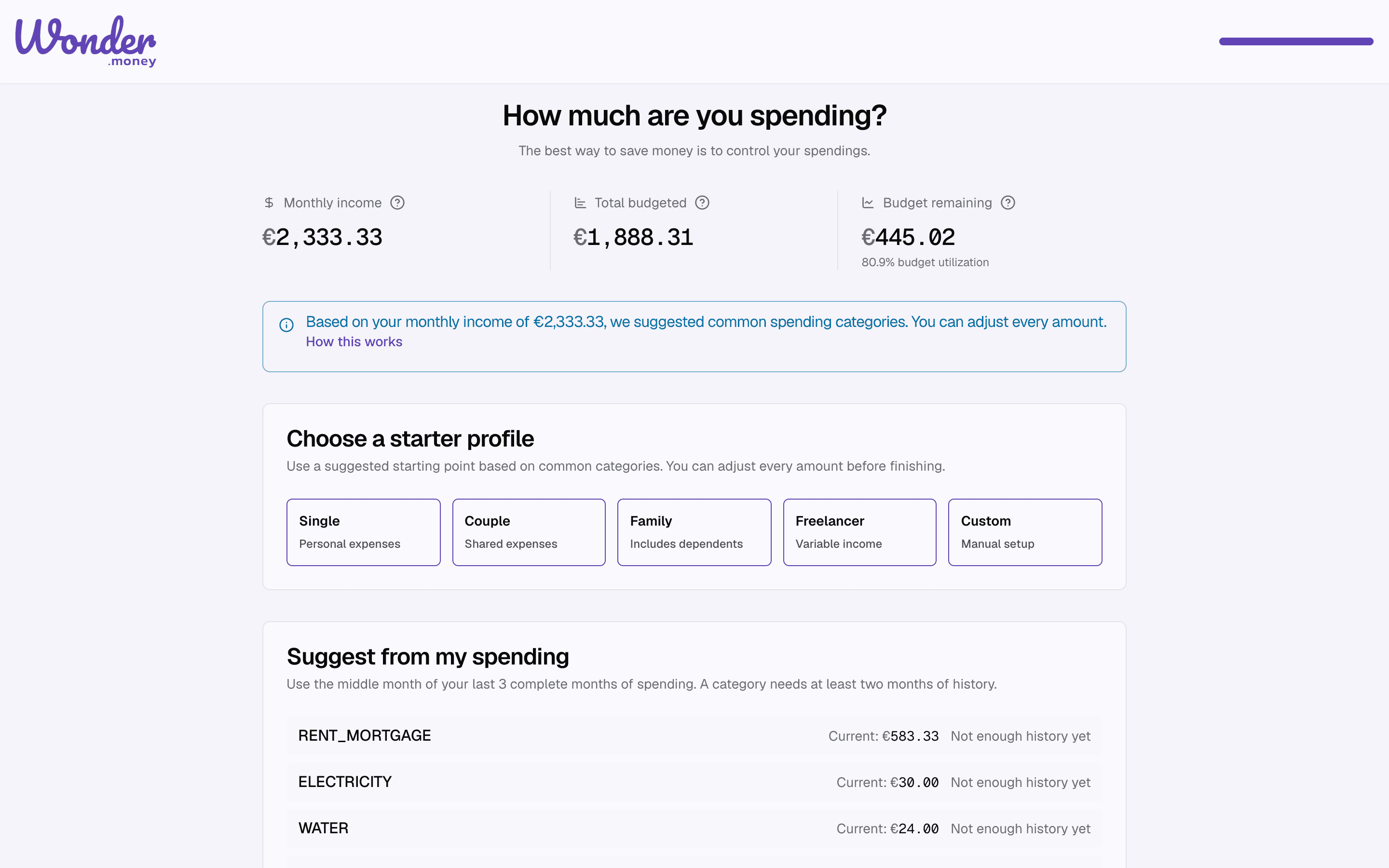
The categories step offers starter profiles: Single, Couple, Family, Freelancer and Custom. A profile suggests amounts for common categories from your monthly income, capped so the suggested total stays within that income. Choose Apply suggestions to fill the matching categories, then adjust any amount. Custom keeps the categories as they are.
Review
Check the list after one or two months of use. If the budget is too detailed, merge categories; if it is too vague, split the areas that need separate tracking.
Common issues
- Similar categories were added twice.
- A category is missing even though it appears often.
- The list reflects goals rather than actual spending.
- Too many optional categories were selected on the first pass.